
AudioCast S3.0.11.211201 - Get APK
You'll be able to download in few seconds.
Publisher Description

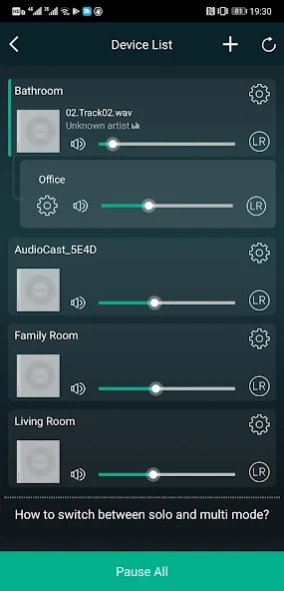

AudioCast S supports old products (2018 and before)
AudioCast S supports old products (2018 and before), and products after 2018 download the "AudioCast" application of the new architecture.
AudioCast S is AudioCast multiroom audio streaming and smart control application for Android cellphone and tablet. With this app, users can set and control AudioCast devices to play high-quality music and enjoy multiroom features. AudioCast team is continuously devoted to developing and upgrading its innovative audio streaming system. Its product range includes wireless/wired music streamer, wireless/wired streaming amplifier, and wireless speaker.
Main features:
Multiroom audio play and control, you can play different music in different rooms or play the same music in sync to all rooms by your smart cellphone, tablet or PC, within the distance that your home network can cover.
Streaming services: Spotify, Tidal, Deezer, Qobuz, Napster, iHeartRadio, Pandora, QQ Music, *Amazon Music,*Hi-ResCloud,Internet Radio and etc. You can enjoy your favorite music or radio from these music services;
Streaming protocols: DLNA, Qplay, Spotify Connect,*CastAudio
External audio input:AUX IN,USB DISK,*Optical in,*RCA in,*Bluetooth
Support: EQ settings (Bass/Treble/*3D music/*Bass boost)
Support:*the on/off of the prompt tone
Support: *on/off of indicator light
Note: The functions and audio sources marked with "*" are supported by some models. Please refer to the latest firmware release notice and manual.
About AudioCast S
The company that develops AudioCast S is AudioCast Software. The latest version released by its developer is 3.0.11.211201.
To install AudioCast S on your Android device, just click the green Continue To App button above to start the installation process. The app is listed on our website since 2021-12-01 and was downloaded 0 times. We have already checked if the download link is safe, however for your own protection we recommend that you scan the downloaded app with your antivirus. Your antivirus may detect the AudioCast S as malware as malware if the download link to com.wifiaudio.AudioCast is broken.
How to install AudioCast S on your Android device:
- Click on the Continue To App button on our website. This will redirect you to Google Play.
- Once the AudioCast S is shown in the Google Play listing of your Android device, you can start its download and installation. Tap on the Install button located below the search bar and to the right of the app icon.
- A pop-up window with the permissions required by AudioCast S will be shown. Click on Accept to continue the process.
- AudioCast S will be downloaded onto your device, displaying a progress. Once the download completes, the installation will start and you'll get a notification after the installation is finished.
Program Details
System requirements
Download information
Pricing
Version History
version 3.0.11.211201
posted on 2021-12-01
1.Fixed known bugs.
2.Optimized the experience
version 3.0.1.210303
posted on 2021-03-03
-Expand Amazon Music supported regions (except the USA previously, now available in other countries like the UK, Australia, New Zealand, Brazil, Canada, France, Italy, Spain, Germany, Mexico, Japan, India and etc.) ;
-Tidal supports Next-song function now ;
-Enhance multiroom grouping stability ;
version 3.0.1.201119
posted on 2020-11-19
AudioCast App will be new called "AudioCast S" ;
Added : support the preset of Deezer ;
Optimized : Compatible with more devices.
version 3.0.1.201110
posted on 2020-11-10
Thank you for choosing AudioCast!
Fixed support for more devices.
Note: Some new functions of the app require product firmware support.
version 3.0.1.201106
posted on 2020-11-07
1. Optimized the bug that the device cannot be displayed normally in the device list;
2. The feedback function has been added, and if you encounter an abnormality during use, you can feedback it to us as soon as possible through this function. Thank you!
version 3.0.1.200430.8c0695
posted on 2020-10-29
Supported the preset for New Tunein with App update
version 3.0.1.201029
posted on 2020-10-29
New functions need new firmware support: 4.2.8822, please update in time.
New Features:
1. Support browsing U disk files in folder mode;
2. Support playing AIFF lossless music;
3. Added the on/off function of power-on prompt sound;
Optimization:
1. TIDAL: new API interface and login interface, support multi-account login, support song quality selection;
2. Optimized the reliability of multi-room playing;
3. Optimized the on/off button of Wi-Fi hotspot;
4. Optimized the app UI display;
version 3.0.1.191219.166e05
posted on 2019-12-24
1.Added DEEZER
2.Added amazon Music (supports US only)
3.Added New Tunein
4.Added direct-connected stand-alone playback mode
5.Added EQ control (Production date is 2019 model)
6.Support NAS song collection and add song list
Notes: *Need new firmware support(4.2.xxxx.x). If the firmware update fails, please contact the distributors for the update firmware or write email to audiocastservice@gmail.com
version 3.0.1.190816.1d7484
posted on 2019-08-16
1、 according to google requirements, permissions and user data policies and changes to the application.
2、announce in advance: Support for Amazon Music and DEEZER will be added in October.
version 2.9.171012.16d07a
posted on 2017-11-22
#fixed the fault radio stations
#fixed the false timeout notification in WPS connection way
Disclaimer
External Download
We do not host AudioCast S on our servers. We did not scan it for viruses, adware, spyware or other type of malware. This app is hosted by Galad and passed their terms and conditions to be listed there. We recommend caution when installing it.
The APK Download link for AudioCast S is provided to you by apps112.com without any warranties, representations or guarantees of any kind, so access it at your own risk.
If you have questions regarding this particular app contact the publisher directly. For questions about the functionalities of apps112.com contact us.
